


High-Performance Open-Source Archive
Tidy, analyze, and plot causal directed acyclic graphs (DAGs).
ggdag uses the powerful dagitty package to
create and analyze structural causal models and plot them using
ggplot2 and ggraph in a consistent and easy
manner.
You can install ggdag with:
install.packages("ggdag")Or you can install the development version from GitHub with:
# install.packages("devtools")
devtools::install_github("r-causal/ggdag")ggdag makes it easy to use dagitty in the
context of the tidyverse. You can directly tidy dagitty
objects or use convenience functions to create DAGs using a more R-like
syntax:
library(ggdag)
library(ggplot2)

#  example from the dagitty package
dag <- dagitty::dagitty("dag {
    y <- x <- z1 <- v -> z2 -> y
    z1 <- w1 <-> w2 -> z2
    x <- w1 -> y
    x <- w2 -> y
    x [exposure]
    y [outcome]
  }")

tidy_dag <- tidy_dagitty(dag)

tidy_dag
#> # A DAG with 7 nodes and 12 edges
#> #
#> # Exposure: x
#> # Outcome: y
#> #
#> # A tibble: 13 × 8
#>    name       x      y direction to       xend   yend circular
#>    <chr>  <dbl>  <dbl> <fct>     <chr>   <dbl>  <dbl> <lgl>
#>  1 v     0.496  -3.40  ->        z1     1.83   -2.92  FALSE
#>  2 v     0.496  -3.40  ->        z2     0.0188 -2.08  FALSE
#>  3 w1    1.73   -1.94  ->        x      2.07   -1.42  FALSE
#>  4 w1    1.73   -1.94  ->        y      1.00   -0.944 FALSE
#>  5 w1    1.73   -1.94  ->        z1     1.83   -2.92  FALSE
#>  6 w1    1.73   -1.94  <->       w2     0.873  -1.56  FALSE
#>  7 w2    0.873  -1.56  ->        x      2.07   -1.42  FALSE
#>  8 w2    0.873  -1.56  ->        y      1.00   -0.944 FALSE
#>  9 w2    0.873  -1.56  ->        z2     0.0188 -2.08  FALSE
#> 10 x     2.07   -1.42  ->        y      1.00   -0.944 FALSE
#> 11 y     1.00   -0.944 <NA>      <NA>  NA      NA     FALSE
#> 12 z1    1.83   -2.92  ->        x      2.07   -1.42  FALSE
#> 13 z2    0.0188 -2.08  ->        y      1.00   -0.944 FALSE

#  using more R-like syntax to create the same DAG
tidy_ggdag <- dagify(
  y ~ x + z2 + w2 + w1,
  x ~ z1 + w1 + w2,
  z1 ~ w1 + v,
  z2 ~ w2 + v,
  w1 ~ ~w2, # bidirected path
  exposure = "x",
  outcome = "y"
) %>%
  tidy_dagitty()

tidy_ggdag
#> # A DAG with 7 nodes and 12 edges
#> #
#> # Exposure: x
#> # Outcome: y
#> #
#> # A tibble: 13 × 8
#>    name      x     y direction to     xend  yend circular
#>    <chr> <dbl> <dbl> <fct>     <chr> <dbl> <dbl> <lgl>
#>  1 v     -3.58  3.30 ->        z1    -4.05  4.63 FALSE
#>  2 v     -3.58  3.30 ->        z2    -2.23  3.74 FALSE
#>  3 w1    -3.03  5.74 ->        x     -3.20  5.14 FALSE
#>  4 w1    -3.03  5.74 ->        y     -1.98  5.22 FALSE
#>  5 w1    -3.03  5.74 ->        z1    -4.05  4.63 FALSE
#>  6 w1    -3.03  5.74 <->       w2    -2.35  4.72 FALSE
#>  7 w2    -2.35  4.72 ->        x     -3.20  5.14 FALSE
#>  8 w2    -2.35  4.72 ->        y     -1.98  5.22 FALSE
#>  9 w2    -2.35  4.72 ->        z2    -2.23  3.74 FALSE
#> 10 x     -3.20  5.14 ->        y     -1.98  5.22 FALSE
#> 11 y     -1.98  5.22 <NA>      <NA>  NA    NA    FALSE
#> 12 z1    -4.05  4.63 ->        x     -3.20  5.14 FALSE
#> 13 z2    -2.23  3.74 ->        y     -1.98  5.22 FALSE
ggdag also provides functionality for analyzing DAGs and
plotting them in ggplot2:
ggdag(tidy_ggdag) +
  theme_dag()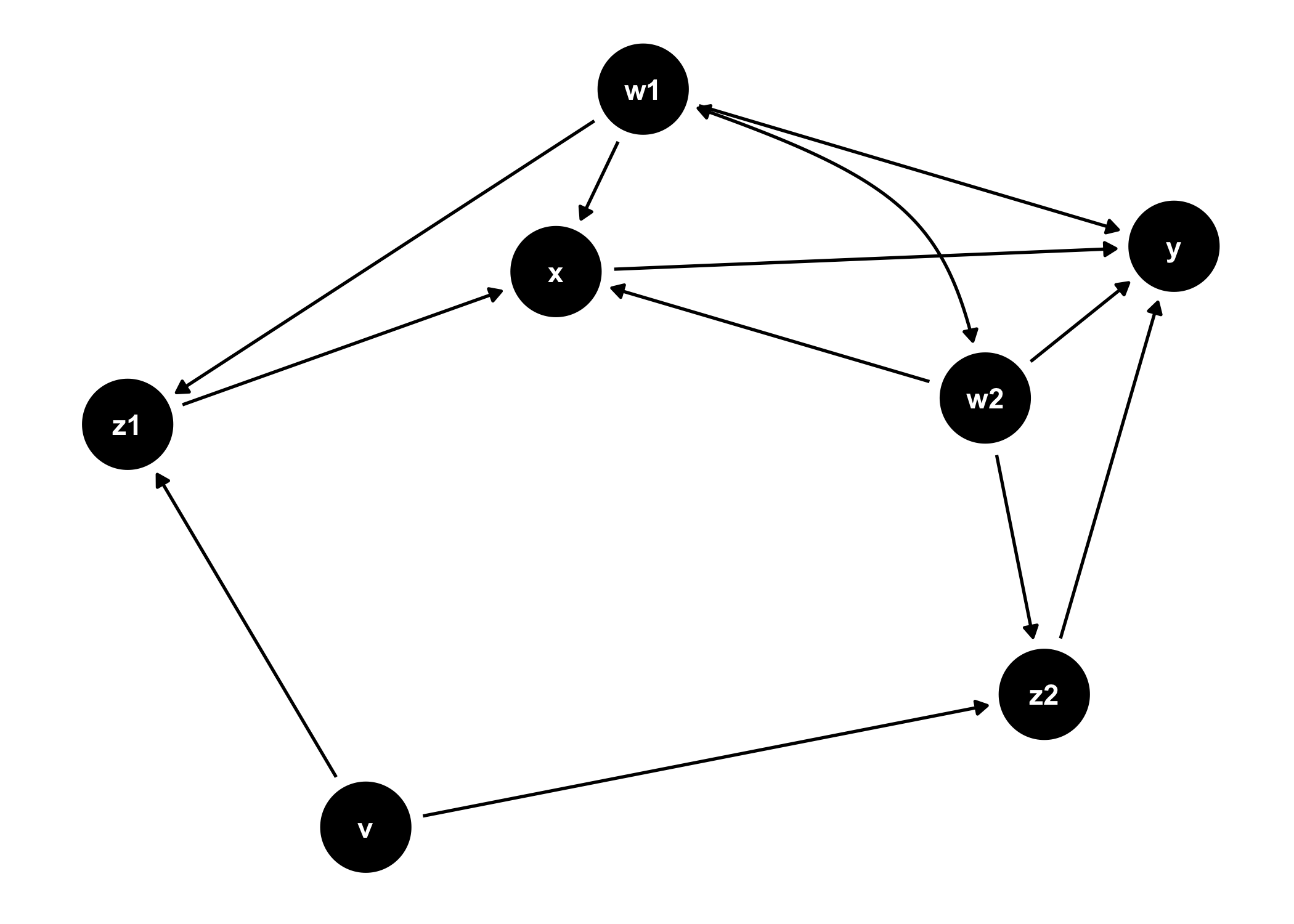
ggdag_adjustment_set(tidy_ggdag, node_size = 14) +
  theme(legend.position = "bottom")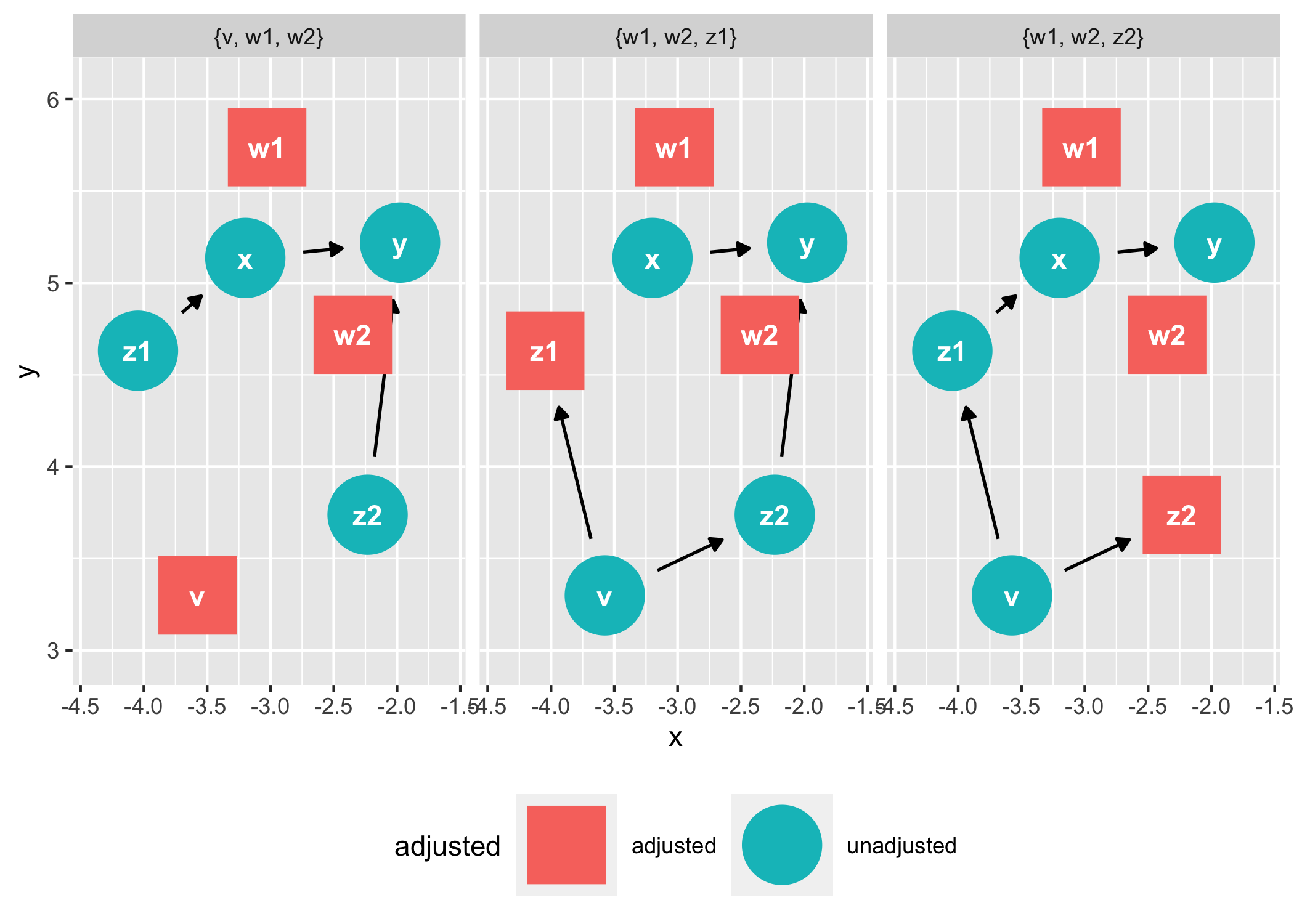
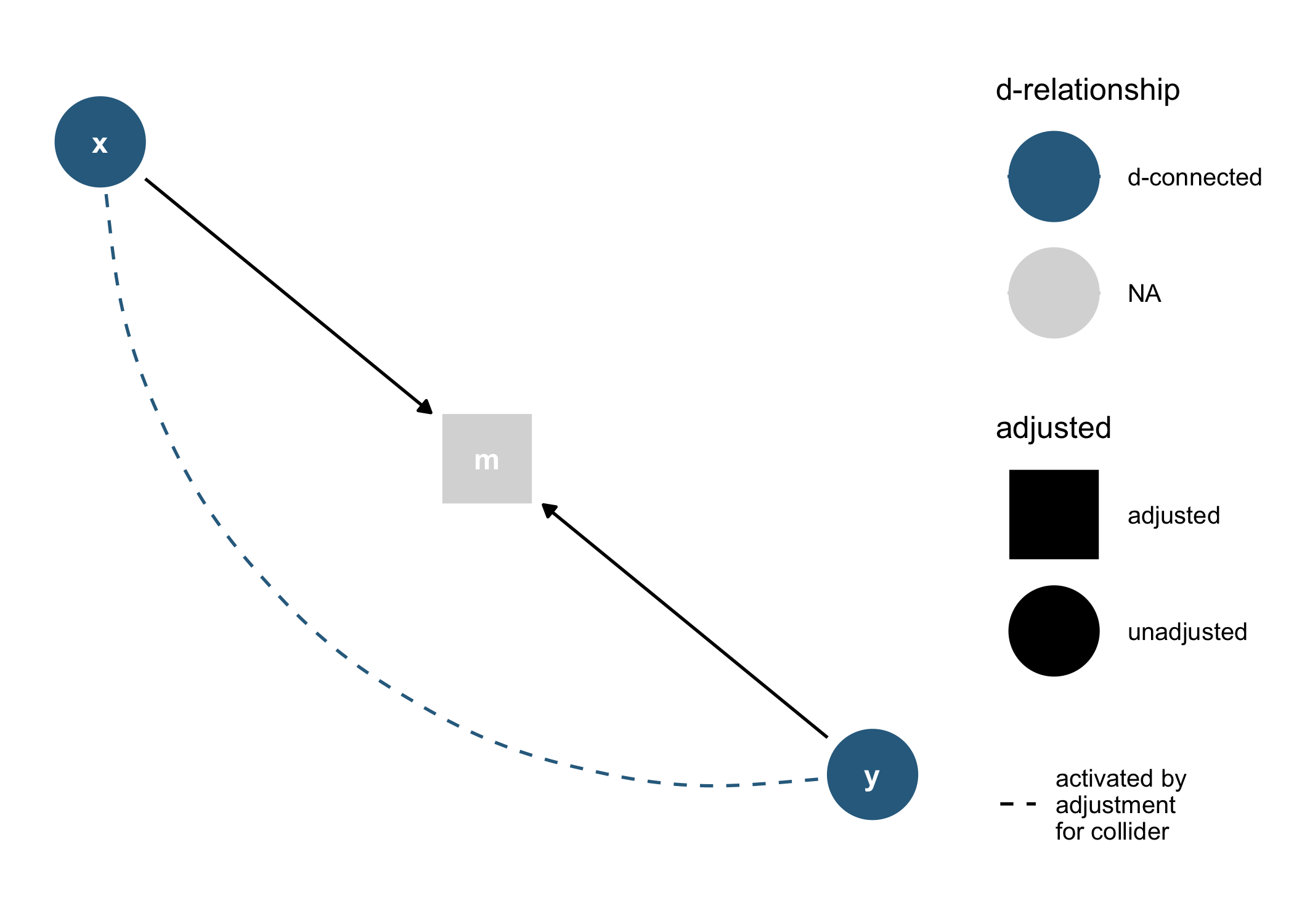
As well as geoms and other functions for plotting them directly in
ggplot2:
dagify(m ~ x + y) %>%
  tidy_dagitty() %>%
  node_dconnected("x", "y", controlling_for = "m") %>%
  ggplot(aes(
    x = x,
    y = y,
    xend = xend,
    yend = yend,
    shape = adjusted,
    col = d_relationship
  )) +
  geom_dag_edges(end_cap = ggraph::circle(10, "mm")) +
  geom_dag_collider_edges() +
  geom_dag_point() +
  geom_dag_text(col = "white") +
  theme_dag() +
  scale_adjusted() +
  expand_plot(expand_y = expansion(c(0.2, 0.2))) +
  scale_color_viridis_d(
    name = "d-relationship",
    na.value = "grey85",
    begin = .35
  )
And common structures of bias:
ggdag_equivalent_dags(confounder_triangle())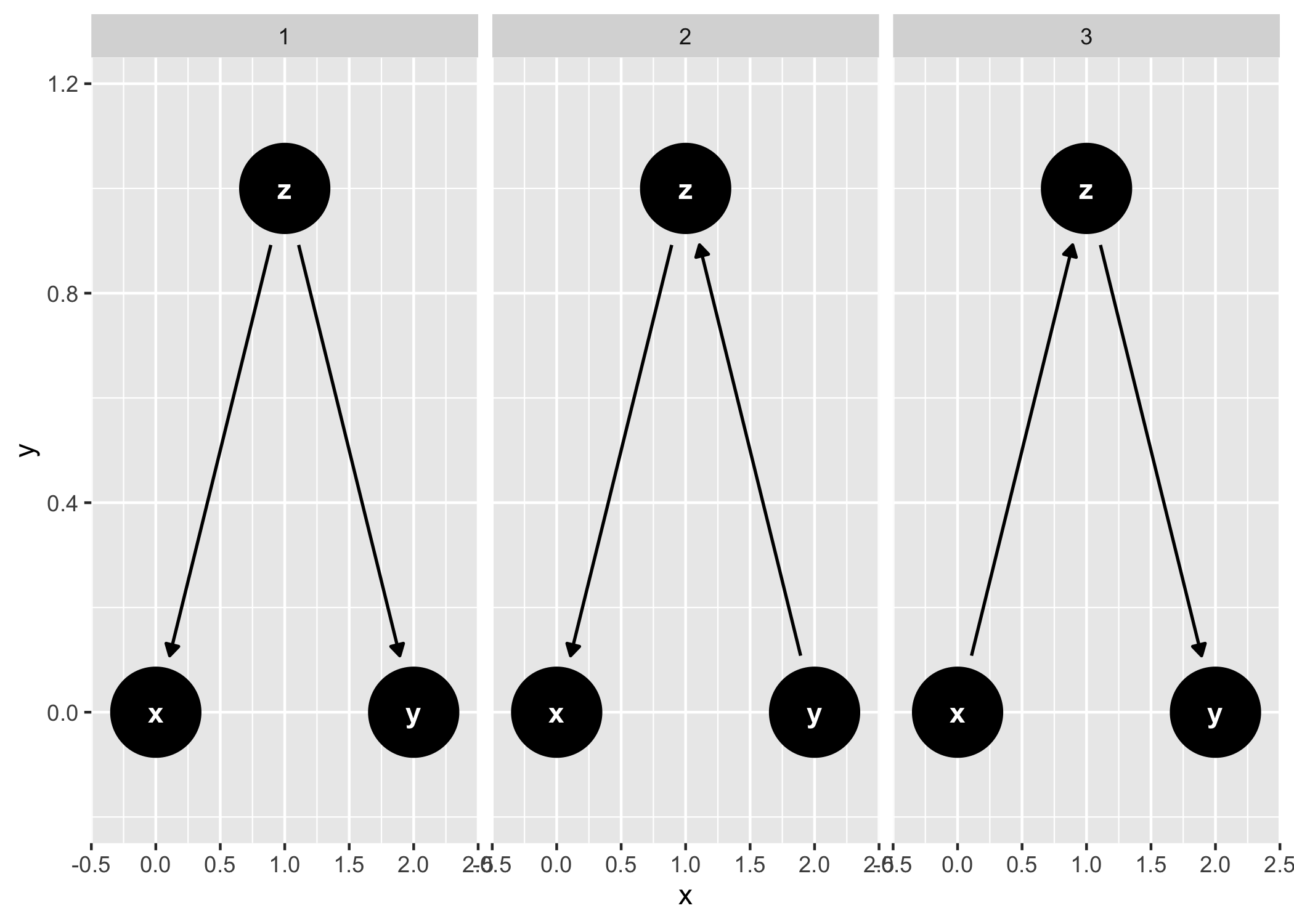
ggdag_butterfly_bias(edge_type = "diagonal")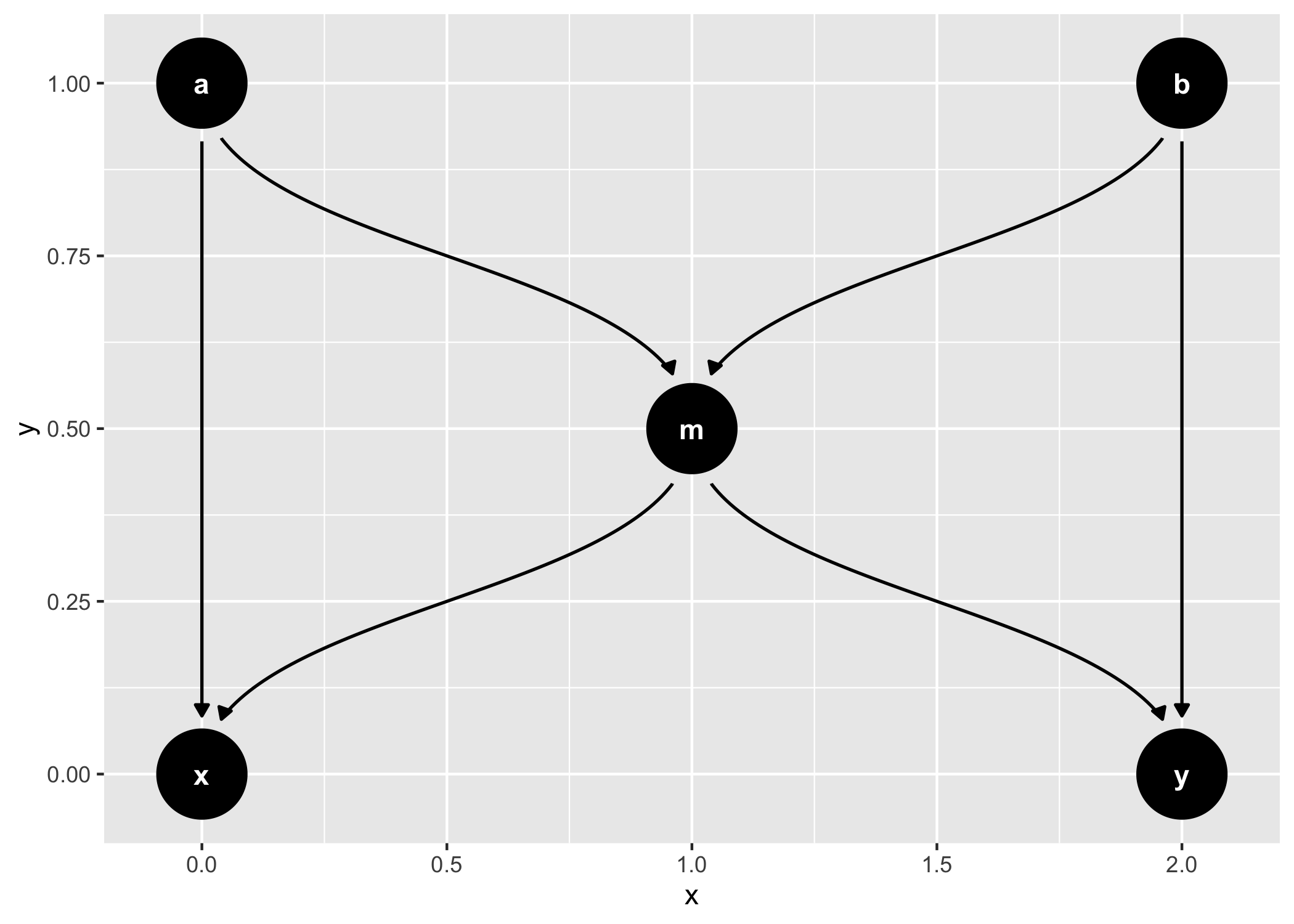
Need mirroring services?
Contact our team at info@vpspulse.com.
Mirror powered by VPSpulse
Infrastructure sponsored by VPSPulse & Secure Payments by ArionPay.