
High-Performance Open-Source Archive
forgts reads a spreadsheet and its formatting information to produce gt tables with the same cell and text formatting as the input file.
Text and cell formats supported include:
Note that formatting in the headers is ignored intentionally in this package, and that the cell and text formatting is added iteratively on top of gt defaults.
Install the development version of forgts from GitHub:
# install.packages("remotes")
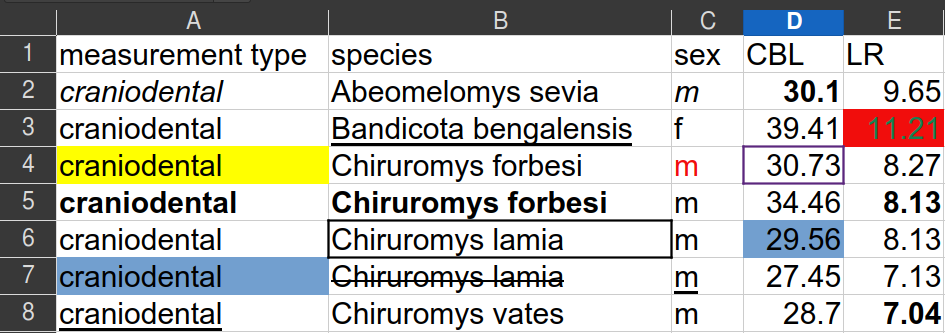
remotes::install_github("luisDVA/forgts")The rodentsheet.xlsx file that comes with this package
looks like this:
The function forgts will read the file and produce a gt
object (shown here as an image).
library(forgts)
###
example_spreadsheet <- system.file("extdata/rodentsheet.xlsx", package = "forgts")

forgts(example_spreadsheet)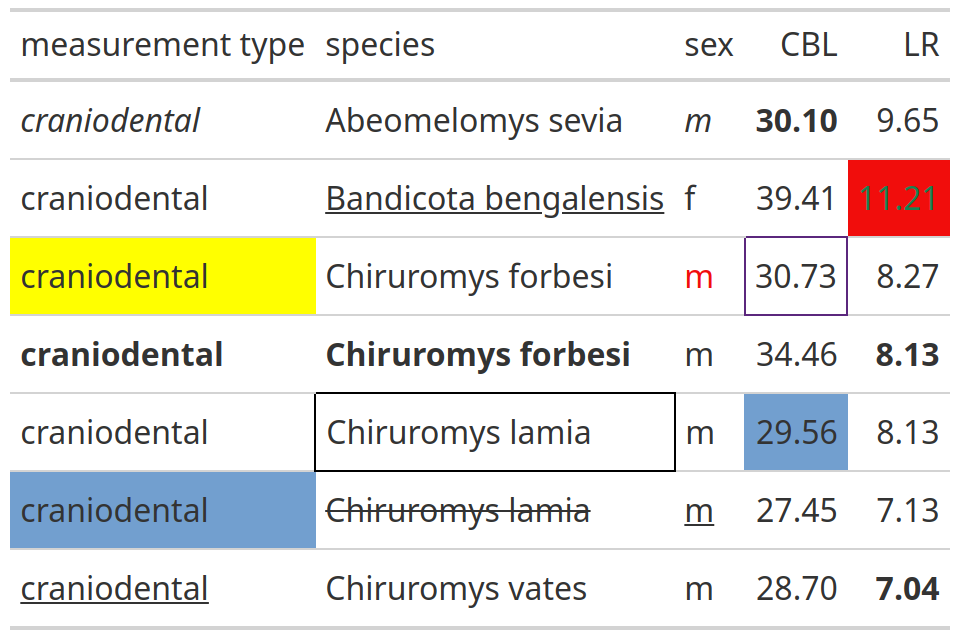
forgts() may be used in RMarkdown and Quarto documents,
and the resulting gt tables may be exported with
gt::gtsave().
Need mirroring services?
Contact our team at info@vpspulse.com.
Mirror powered by VPSpulse
Infrastructure sponsored by VPSPulse & Secure Payments by ArionPay.